Compliance You Can Actually Prove
12+ compliance baselines across Windows, macOS, and Linux — Industry Standard Baselines, DISA STIG Baselines, Microsoft SCT, and your own custom baselines. Per-device, per-rule evidence with the actual values from the endpoint, not just a pass/fail checkmark.
A Library of Compliance Baselines
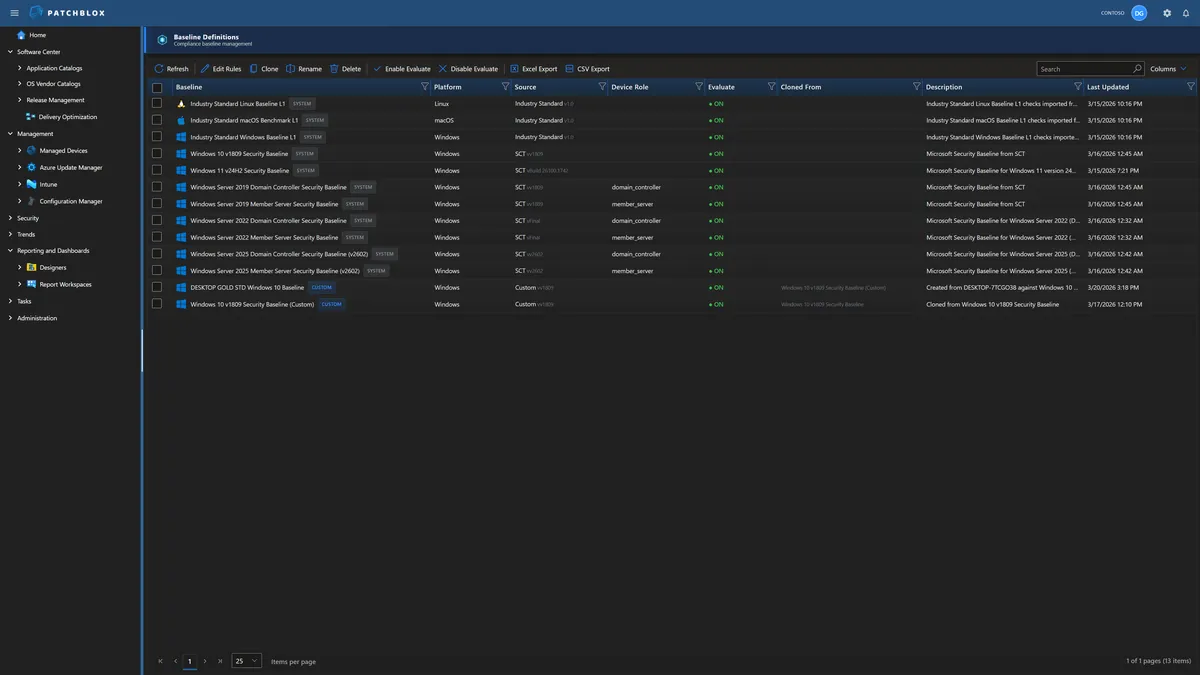
Patchblox ships with 12+ compliance baselines covering Industry Standard baselines for three platforms, Microsoft Security Compliance Toolkit baselines for Windows 10, 11, and Server 2019/2022/2025, and device role-specific variants for Domain Controllers and Member Servers.
Any baseline can be cloned into a custom baseline and tailored to your requirements — or create a brand new baseline by snapshotting a device's actual configuration. Edit rules, adjust expected values, enable or disable evaluation per baseline. Your compliance standards, enforced your way.
Industry Standard Baselines, DIS STIG, Microsoft SCT, and Custom
The right baseline for every platform, every server role, and every compliance requirement
Industry Standard Baselines
Our industry standard for endpoint security configuration, maintained by the Patchblox Team. Cross-platform coverage with Industry Standard baselines.
- DISA STIG Windows Baseline
- DISA STIG macOS Baseline
- DISA STIG Linux Baseline
Microsoft SCT Baselines
Microsoft's Security Compliance Toolkit baselines with device role targeting — separate rules for Domain Controllers vs Member Servers.
- Windows 10 v1809 & Windows 11 v24H2
- Server 2019 / 2022 / 2025
- Domain Controller & Member Server variants
Custom Baselines
Clone any baseline and tailor it, or snapshot a configured device to create a gold standard baseline from its actual settings.
- Clone from any existing baseline
- Snapshot a device to create a gold standard
- Edit rules and expected values
- Enable/disable per baseline
Snapshot a Device. Create a Baseline.
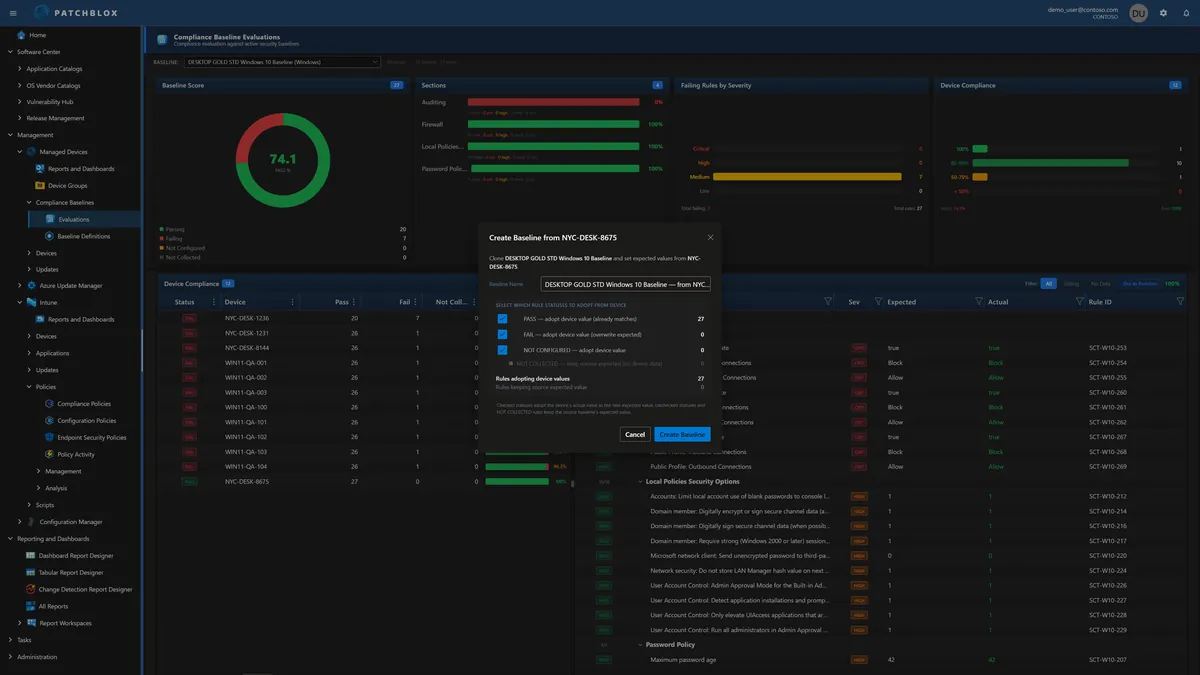
You already have devices configured exactly the way they should be. Instead of manually defining hundreds of rules, point at that device and capture its configuration as a new baseline .
The dialog shows you exactly what will be adopted: rules where the device already passes (56 in this example), rules where it fails (29 — adopting the device's actual value overwrites the original expected value), and rules where data wasn't collected (keeps the source baseline's expected value). You choose which categories to include.
The result is a custom baseline built from a real device — like the "DESKTOP GOLD STD Windows 10 Baseline" shown in the baselines library. Every other device in your fleet is then evaluated against that gold standard. Deviations surface immediately.
Evaluate with Actual Evidence
Select any baseline and see your fleet's compliance scored in real time. The Baseline Score donut shows overall posture. Sections break compliance down by category with rule counts, pass/fail breakdown, and severity distribution. The Device Compliance grid shows every device's pass count, fail count, and overall percentage — click any device to see its full rule-by-rule evaluation.
Unlike Intune Security Baselines — which report whether the CSP successfully applied a setting through the same channel that wrote it — Patchblox collects the actual values from the endpoint independently and compares them against the baseline requirement. A GPO can override what Intune pushed. A conflicting policy can win. Intune still shows "Succeeded." Patchblox shows you: Expected = 14. Actual = 8.
Why This Matters for Audits
SOC 2, HIPAA, PCI-DSS, and FedRAMP require proof of actual configuration state — not a vendor's pass/fail assertion. Patchblox provides that proof: expected vs actual, rule by rule, device by device, exportable to Excel, CSV, or PDF.

Full Rule Visibility
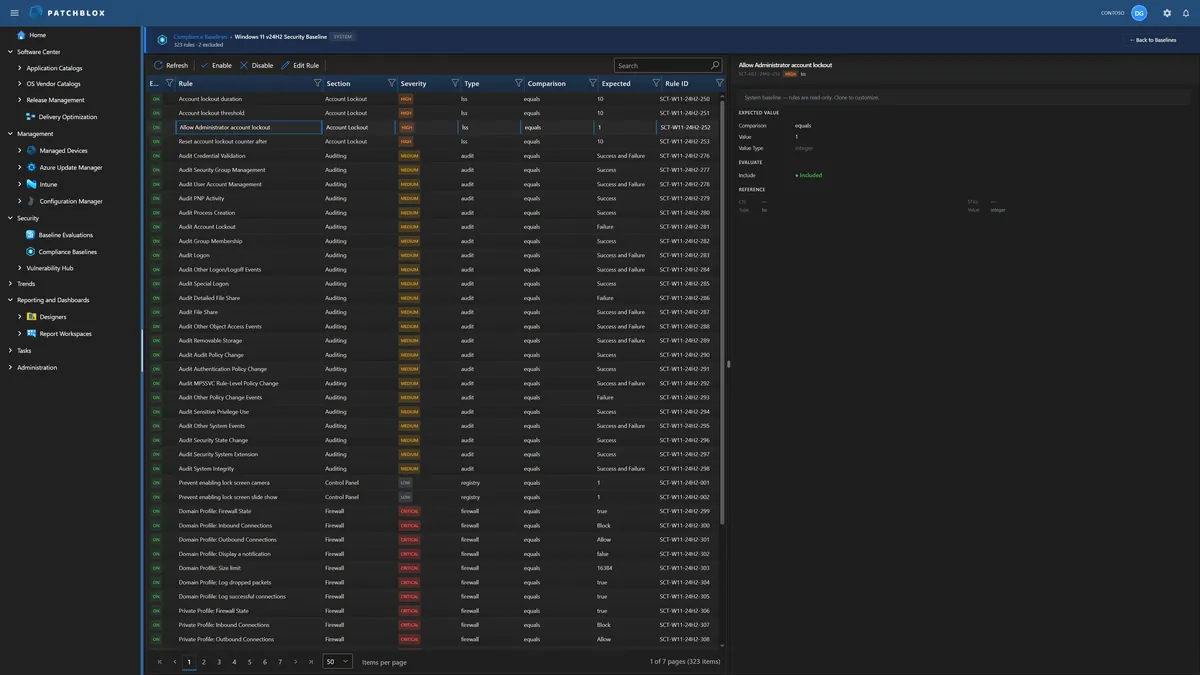
Every baseline exposes its complete rule set — 277 rules in this Windows 10 v1809 custom baseline. Each rule shows its enabled state, name, section, severity (Critical, High, Medium), check type (registry, audit, firewall, lso), comparison operator, expected value, and Rule ID.
The detail panel on the right shows the full rule definition: source baseline reference, comparison type, expected value, value type, whether the rule is included in evaluation, and the Industry Standard/STIG/SCT reference mapping. Enable, disable, or edit any individual rule directly.
Edit Any Rule
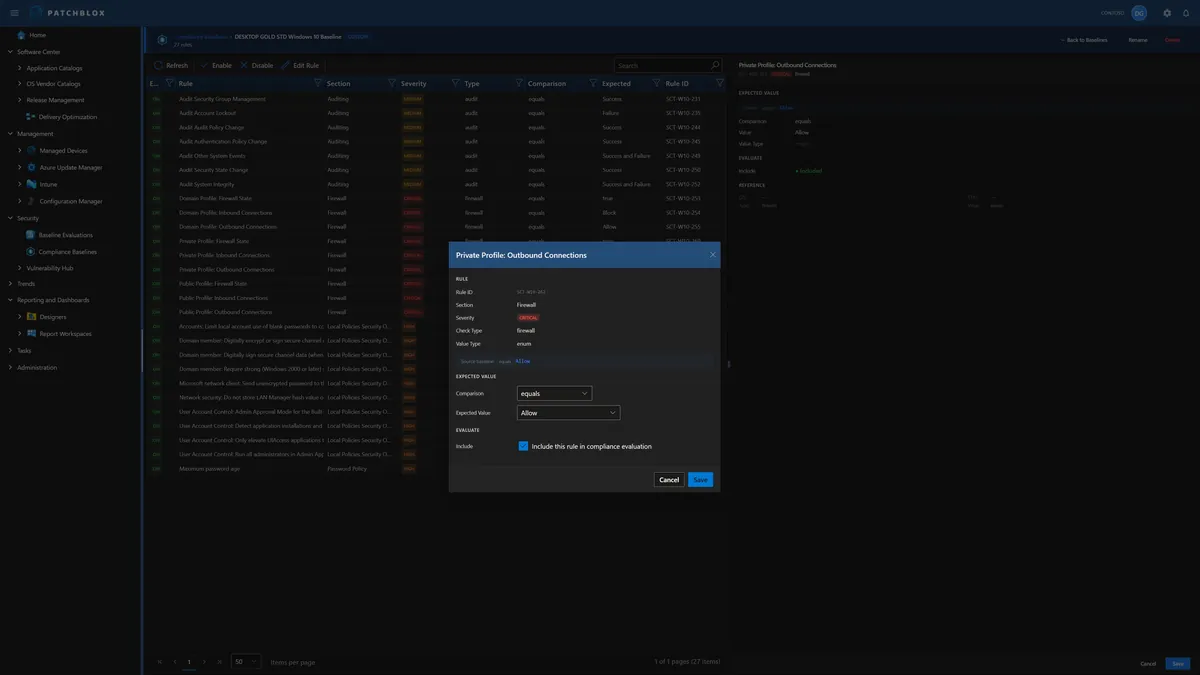
Click Edit Rule to modify any baseline rule. The dialog shows the rule's metadata (Rule ID, Section, Severity, Check Type, Value Type) and lets you change the comparison operator and expected value.
Set whether the rule should use "equals," "not equals," "greater than," or other comparison types. Change the expected value to match your organization's specific requirements. Toggle "Include this rule in compliance evaluation" to enable or disable individual rules without deleting them.
This is the level of control that transforms a generic industry benchmark into your organization's enforceable compliance standard.
Score Your Compliance Posture Today
12+ baselines, 3 platforms, per-rule evidence with actual values — see your compliance within minutes