500+ Data Views. Three Platforms. Any Scale.
Query a single endpoint or your entire fleet across Windows, Linux, and macOS. Every view is a live data source you can explore, filter, export — or build custom reports against with the built-in BI engine.
Resource Explorer
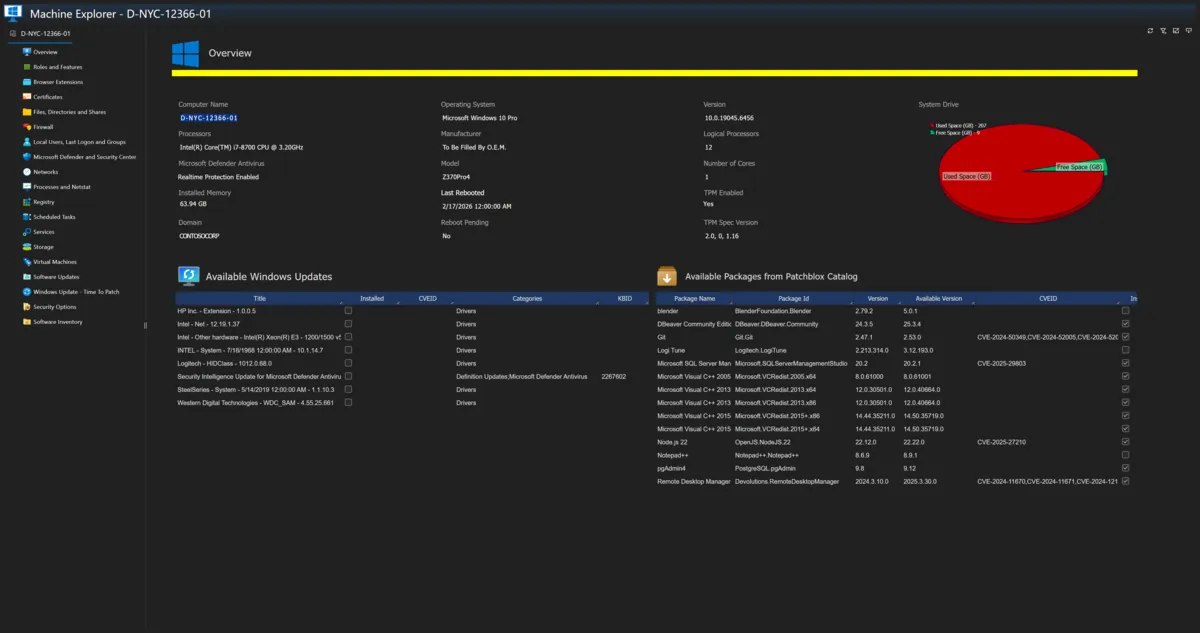
Click any device and drill into 18 categories of live data — from system identity and pending updates to process-level network connections, remote registry browsing, firewall rule enumeration, Hyper-V guest inventory, Docker containers, and KVM virtual machines.
The Overview tab shows hardware, OS, TPM, reboot state, disk space, available Windows updates with CVE IDs, and available Patchblox catalog packages with current vs available versions — all in one screen.
One Device or Fifty Thousand
Resource Explorer works at device level. But every one of these 500+ views is also a fleet-wide data source — filter across your entire environment, sort, search, export to Excel or CSV, or feed into a custom BI report. Same data, any scope.
From Data Source to Report in Minutes
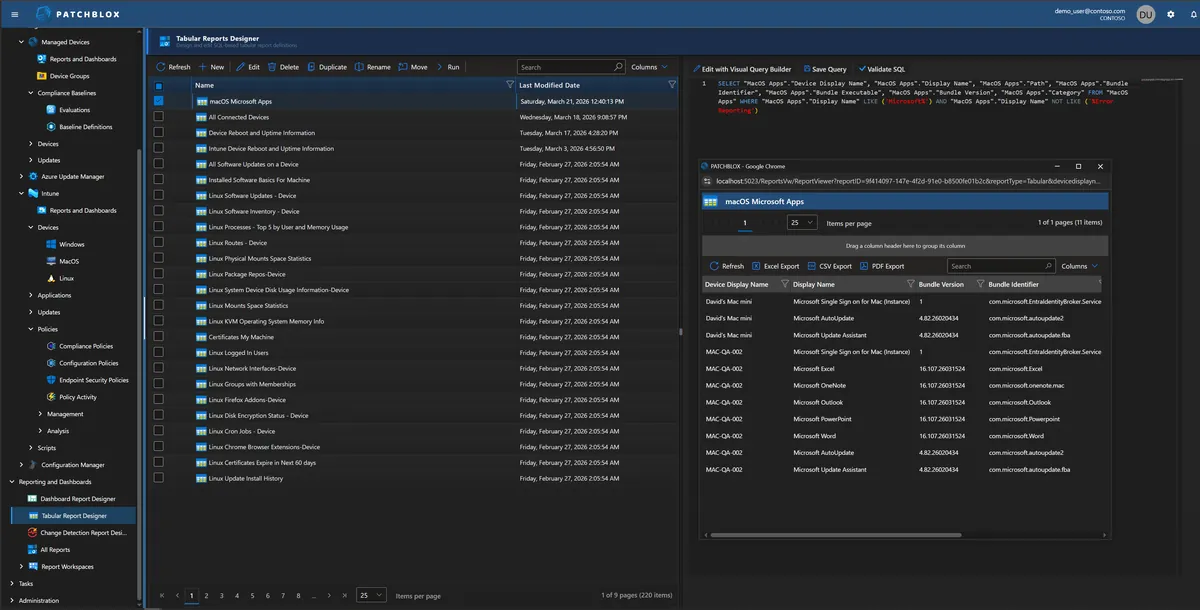
The Tabular Reports Designer gives you 220 out-of-the-box reports across Windows, Linux, and macOS — from software inventory and update status to disk encryption, firewall rules, Docker containers, and KVM virtual machines. Every report is backed by live SQL you can see and modify.
In this example, a macOS Microsoft Apps report queries the MacOS Apps view, filtering to Microsoft applications — and the results show bundle versions, identifiers, and device assignments across the fleet. The SQL is visible in the query editor. The output renders in a paginated, sortable, exportable grid with Excel, CSV, and PDF export.
Every out-of-the-box report can be duplicated and customized. Change the columns, add filters, modify the SQL, save it as your own.
Windows
~180 viewsDeep Windows inventory spanning hardware, security, networking, storage, identity, software, updates, and virtualization. Native integration with Intune, Azure Update Manager, and Configuration Manager enriches every view with management-plane context.
Identity & Directory
- Active Directory Users, Groups, Memberships
- Entra Users, Groups, Directory Objects
- Local Users, Groups, Profiles, Logon Sessions
- User Rights Assignments
Security & Compliance
- Audit Policy, Local Security Settings
- Defender Status, Preferences, Threats
- Security Center Antimalware & Infection Status
- Security Baseline Evidence & Compliance
- Certificates, BitLocker, TPM
Software & Updates
- Win32, Store, & Framework Programs
- Software Inventory by user/system scope
- Windows Update History, Scan, Settings (5 views)
- Microsoft Cumulative Updates Catalog
- Installation Latency & Security Latency
- Software Vulnerabilities Catalog
Hardware & Storage
- BIOS, Computer System, Processors, Memory
- Disk Drives, Partitions, Volumes, Logical Disks
- Desktop Monitors, Display Configuration
- CD-ROM, Sound Devices, Portable Battery
Networking & Firewall
- Network Adapters, Configuration, Protocols
- Netstat, Network Connections
- Firewall Settings & Rules (inbound/outbound)
- Delivery Optimization Settings & Files
Processes, Services & Tasks
- Processes with network connections
- Services with state, start type, account
- Scheduled Tasks, Startup Commands
- Drivers, System Drivers
Intune & AUM Integration
- Compliance & Configuration Policy Status
- Compliance & Configuration Trends
- Device Settings per compliance/config policy
- Discovered Apps, Managed Apps, Install Status
- Update Rings, Update Catalog, Group Assignments
- AUM Devices & Software Inventory
Virtualization
- Hyper-V Virtual Machines
- VM states, memory, OS, resources, checkpoints
Linux
~145 viewsosquery-based Linux inventory covering Ubuntu, Debian, RHEL, and Fedora. Not a Windows tool with Linux bolted on — native coverage of package managers, kernel modules, container runtimes, KVM virtualization, SELinux/AppArmor, and Linux-specific security tooling.
Packages & Software
- Debian Packages & Package Files
- RPM Packages & Package Files
- APT Sources, Yum Sources, Package Repos
- Portage Packages, Keywords, Use Flags
- Npm, Python, PBGet Packages
- Software Inventory & Updates
Docker (25 views)
- Containers, Stats, Processes, Labels
- Container Networks, Ports, Mounts, FS Changes
- Images, History, Layers, Labels
- Networks, Volumes, Version, Info
KVM Virtualization (7 views)
- KVM Host, Virtual Machines
- VM Disks, VM Interfaces
- Networks, Storage Pools, Storage Volumes
LXD Containers (8 views)
- Instances, Config, Devices
- Images, Certificates
- Cluster, Members, Networks, Storage
Security & Access
- SELinux Settings, AppArmor Profiles
- IPtables, Secure Boot
- Authorized Keys, SSH Configs, Known Hosts
- Sudoers, SUID Binaries, Shadow
- Certificates, Carbon Black Info
System & Hardware
- System Info, Kernel Info, Kernel Modules
- CPU Info, Memory Devices, Block Devices
- Disk Encryption, ACPI Tables, SMBIOS
- USB & PCI Devices, Intel ME Info
Processes & Networking
- Processes, Namespaces, Open Files/Pipes/Sockets
- Listening Ports, Routes, ARP Cache
- Interface Addresses, Details, IPv6
- DNS Resolvers, Etc Hosts/Protocols/Services
Users & Identity
- Users, Groups, Group Assignments
- User SSH Keys, Last Login, Logged In Users
- Shell History, Crontab, Startup Items
macOS
~165 viewsmacOS-native inventory that understands Gatekeeper, Xprotect, SIP, FileVault, Time Machine, launchd, and the Apple security stack — not a generic agent pretending Macs are Windows machines.
Apple Security Stack
- Gatekeeper & Approved Apps
- Xprotect Entries, Meta, Reports
- SIP Config, Secure Boot
- Disk Encryption (FileVault)
- ALF Firewall, Exceptions, Explicit Auths
- Sandboxes, Signatures, System Extensions
Packages & Software
- Apps, Package Receipts, Install History
- Package BOM, Homebrew Packages
- Npm, Python, PBGet Packages
- Software Updates & System Updates Catalog
- Running Apps
Docker (25 views)
- Containers, Stats, Processes, Labels
- Container Networks, Ports, Mounts, FS Changes
- Images, History, Layers, Labels
- Networks, Volumes, Version, Info
Hardware & Sensors
- Battery, Fan Speed, Temperature, Power Sensors
- Connected Displays, USB & PCI Devices
- Device Firmware, Ibridge Info, SMC Keys
- Memory Devices & Arrays
- IOKit Device Tree & Registry
Identity & Access
- Users, Groups, User SSH Keys
- AD Config, Managed Policies
- Keychain Items & ACLs
- Authorization Mechanisms & Authorizations
- Password Policy, Account Policy Data
System & Configuration
- Launchd, Launchd Overrides, Startup Items
- Preferences, Sharing Preferences, Location Services
- Time Machine Backups & Destinations
- WiFi Networks, Status, Survey
- NFS Shares, Shared Folders, CUPS Printers
Processes & Networking
- Processes, Memory Map, Open Files/Sockets
- Listening Ports, Routes, ARP Cache
- Interface Addresses, Details, IPv6
- DNS Resolvers, Etc Hosts/Protocols/Services
Browser & Developer
- Chrome Extensions & Content Scripts
- Firefox Addons, Safari Extensions
- Browser Plugins, VSCode & JetBrains Extensions
- App Schemes
Cross-Platform Coverage
These capabilities work identically across all three platforms — same data structure, same reports, same fleet-wide visibility
Software Inventory
All installed software by user vs system scope, with version, install date, and source
Software Updates & Patching
Pending updates with scan results, CVE correlation, and installation latency
Security Baseline Compliance
Industry Standard Benchmarks with per-rule expected vs actual evidence
Processes & Network Connections
Running processes with open sockets, listening ports, and connection state
Certificates
Certificate store inventory with expiration monitoring
Docker Containers
25 views per platform — containers, images, networks, volumes, stats
Browser Extensions
Chrome, Firefox, Safari, Edge, VSCode, and JetBrains plugins
Users, Groups & SSH Keys
Local accounts, group membership, SSH authorized keys, and login history
Every View Is a Report Data Source
All 500+ views are available in the Visual Query Builder. Drag tables, join them, pick columns, add filters — or drop into the Monaco SQL editor for full control. Build dashboards, tabular reports, and change timelines against any combination of data sources. Out-of-the-box reports ship for core use cases, and every report can be cloned and customized.
No Power BI. No SSRS. No external tooling. The BI engine is built in.
Explore Reporting →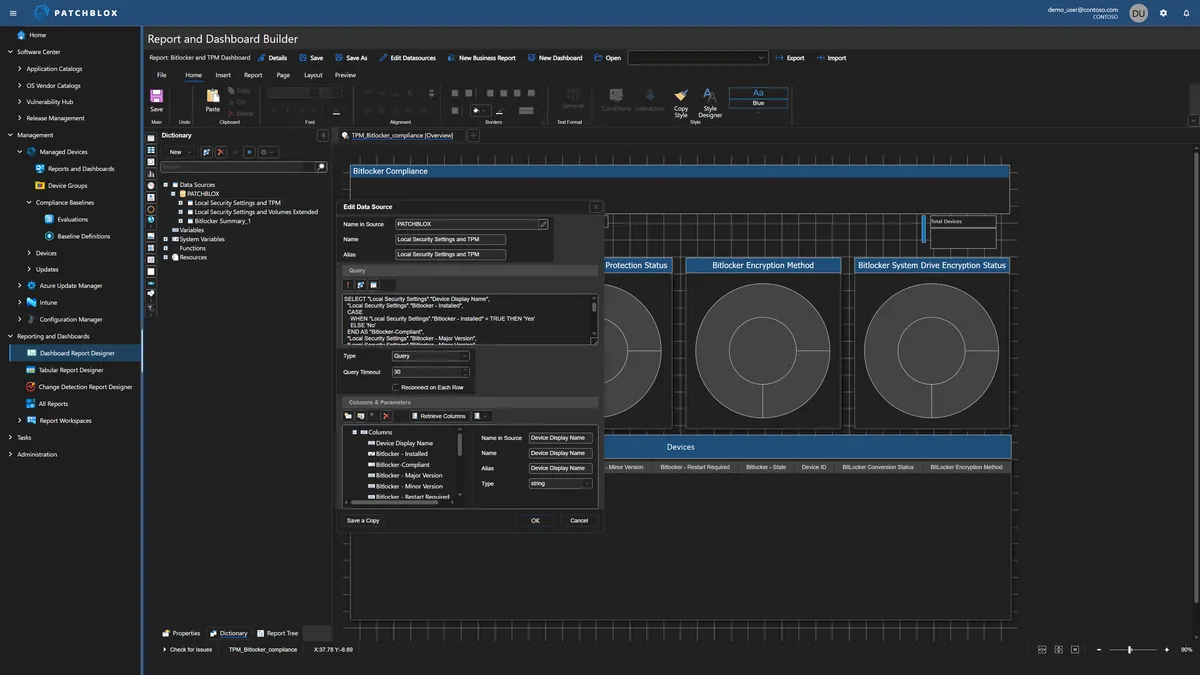
See What You've Been Missing
500+ data views across three platforms — explore the deepest endpoint visibility available for Microsoft-managed environments