The Governance Layer Intune Needs
Policy version control, silent change detection, baseline drift analysis, historical compliance trending, and complete audit trails — extending Intune into a fully auditable governance platform.
Policy Change Timeline
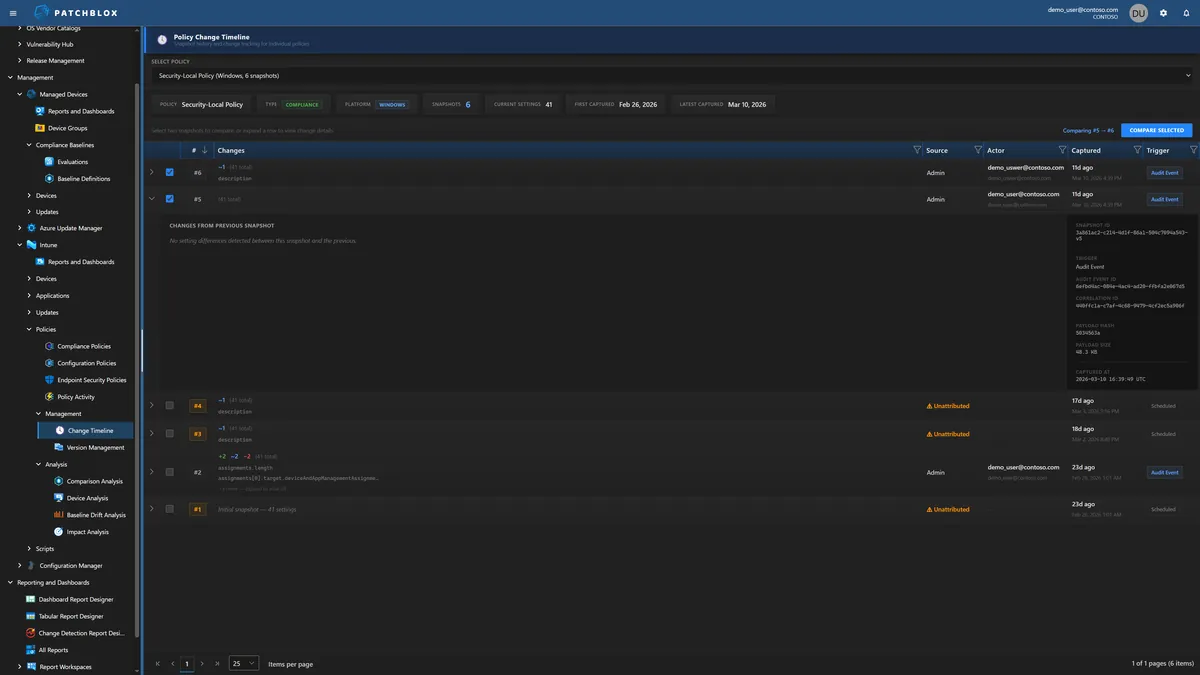
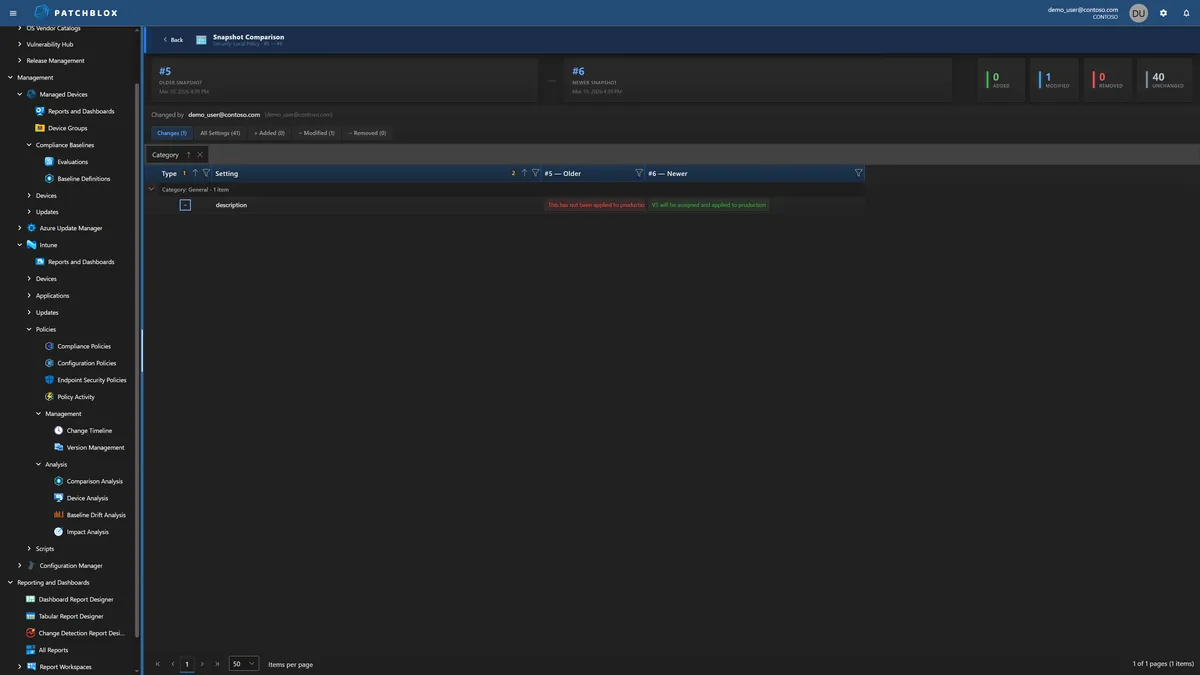
See every version of every policy, who changed it, when, and exactly what changed. Expand any snapshot to see the full change detail — fields added, modified, removed — with inline red/green diff showing before and after values.
Each snapshot tracks the source (Admin action or Scheduled scan), the actor's identity, the trigger type (Audit Event or Scheduled), and a cryptographic payload hash for integrity verification.
Extended Change Detection
When a linked compliance script or detection script changes, Intune does not update
the policy's lastModifiedDateTime. The modification is invisible in
Intune's audit log and policy version counter.
Patchblox catches these because it snapshots the full policy body including script content. Every modification is captured — whether Intune records it or not. You'll never have an unattributed change slip through your audit trail again.
Baseline Drift Detection
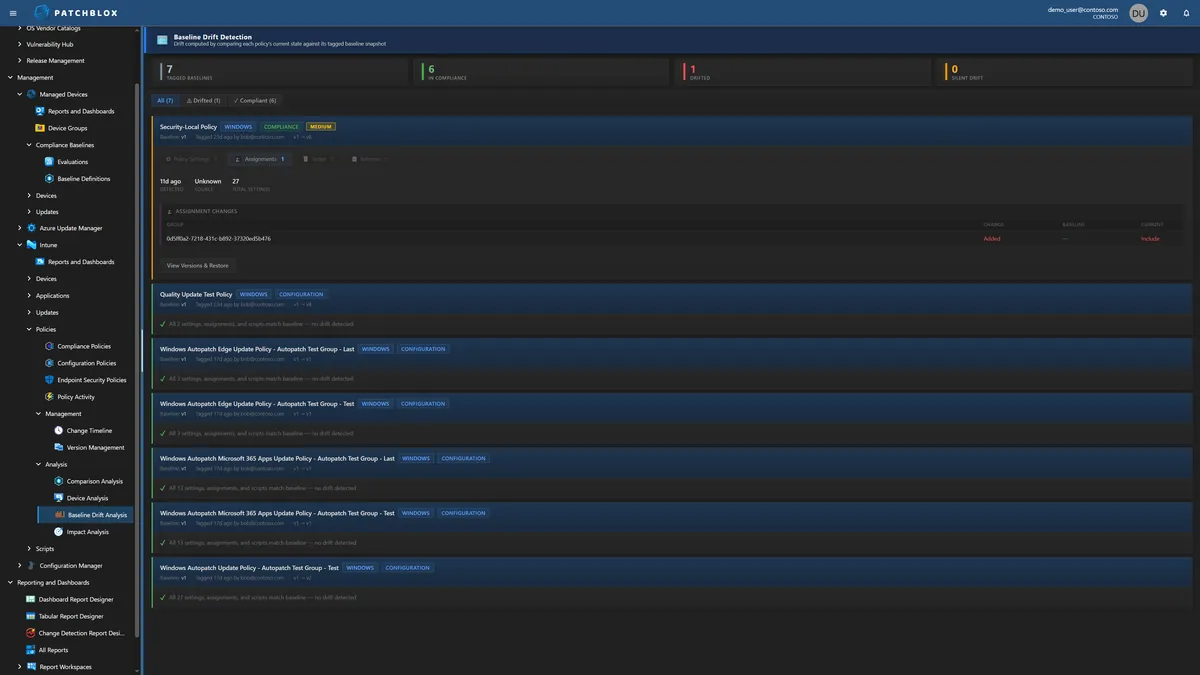
Tag any policy version as your approved baseline. Patchblox continuously monitors for drift — comparing the current state against the baseline across policy settings, assignments, and scripts.
When drift is detected, you see exactly what changed: assignment additions and removals, setting modifications, with baseline vs current values side by side. One click to view versions and restore to your approved state.
Historical Compliance Trending
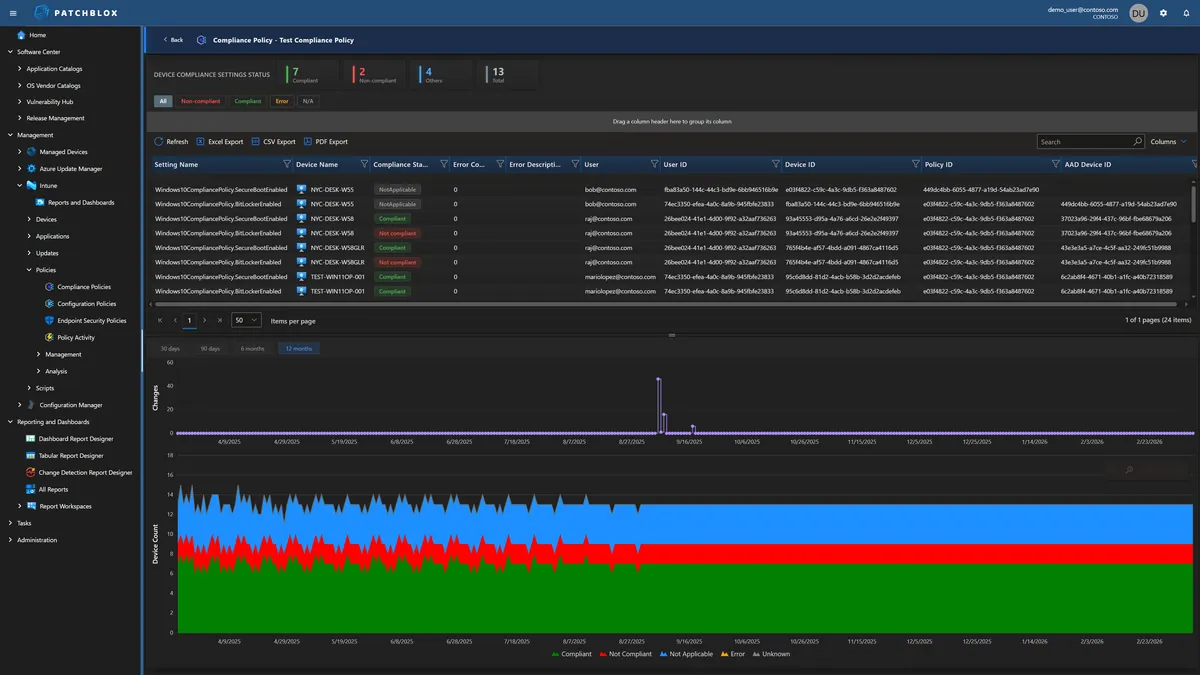
Intune shows you today's compliance snapshot. Patchblox shows you the journey — per-setting compliance trending over 30, 90, 180, and 365 days. See compliance improving or degrading over weeks and months, correlated with the policy changes that caused the shifts.
Filter by status (Compliant, Non-compliant, Error, Not Applicable) and drill into individual device compliance per setting. The stacked bar charts show device count by compliance state over your selected time range.
Applied Doesn't Mean Effective
Intune Security Baselines report whether the CSP (Configuration Service Provider) successfully applied a setting. Microsoft defines "Succeeded" as the setting on the device matching the value configured in the profile. But that check is performed through the same CSP channel that wrote the setting — Intune asks the CSP "did this take?" and the CSP says yes.
The problem: Microsoft's own documentation acknowledges that other processes can later change settings on the device — including Group Policy configurations, conflicting device configuration profiles, and manual edits. Intune does not re-verify after those changes occur. A GPO can override what Intune pushed. A conflicting policy can win. A local admin can change a registry value. Intune still shows "Succeeded" because the CSP reported success at write time.
Patchblox takes a fundamentally different approach: we collect the actual values from the endpoint — independently of the CSP channel — and compare them against the baseline requirement. Expected: minimum password length = 14. Actual on this device: 8. That's the difference between proving intent and proving state. Auditors care about state.

Complete Intune Governance
Everything you need to manage, audit, and prove compliance across your Intune environment
Compliance Policy Management
All compliance policies in one view with per-device status, compliance donut charts, per-setting device summaries, and scope tag visibility.
Configuration Policy Management
Unified view of configuration policies including Windows Autopatch, Settings Catalog, and custom policies with per-setting compliance and change history.
Policy Change Activity
Complete audit log — Created, Updated, Deleted, Assignment changes, Unattributed. Every entry shows actor, timestamp, source, platform, and expandable change details.
Device Comparison
Compare any two devices side-by-side across all policies and settings. See Matched, Divergent, Left Only, Right Only, with per-setting compliance status.
Endpoint Security Policies
Visibility into endpoint security policies including antivirus, firewall, disk encryption, and attack surface reduction configurations.
Script Management & Auditing
Remediation, Compliance, and Platform scripts with Monaco editor, change history tracking, execution settings, and assignment management.
Impact Analysis
Correlate policy changes with compliance outcomes over time. See current compliance, period high/low, and whether changes are improving or degrading your posture.
Version Management
Visual timeline of every policy version with change type indicators (Policy, Assignments, Script, Schema). Set baselines, compare versions, restore previous states.
See Intune Governance in Action
Schedule a demo and we'll walk through your actual Intune environment with Patchblox governance applied